
What is Zapier? – What I’ve Been Through and How to Get Started
We all use a lot of different apps every day in the digital world we live in. For example, you can use Gmail to send emails, Google Sheets to store data, WhatsApp to talk to people, and WordPress to write blogs. It might be tiring and take a lot of time to manage all of these tools by hand.
I used to do most of my work by hand. I copied data, saved files, and sent notifications on my own. To be honest, it took up a lot of my time.
Then I found out about Zapier, and everything changed.
This essay will explain what Zapier is, how it works, and how it helped me work better, not harder.
What does Zapier do?
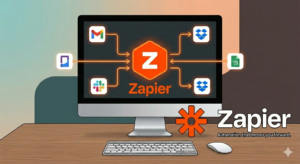
Zapier is a solution that works online to connect different apps and make them function together without any help.

To put it simply:
Zapier makes another app do something for you when something happens in one app.
As an example:
Someone fills out a form → Data gets to Google Sheets
You get an email → File saves to Google Drive
You post a blog → Post shares on social media

All this happens automatically.
When I initially tried Zapier, I honestly thought, “Why didn’t I start using this earlier?” 😄
How Does Zapier Work?
Zapier works using two primary parts:
✅ 1. Trigger
A trigger is the event that starts automation.
Examples:
New email received
New form submitted
New order placed
✅ 2. Action
An action is what happens following the trigger.
Examples:
Save data
Send message
Create task
🔹 Example:
Trigger: Someone fills a website form
Action: Their details are saved in Excel
This link is called a Zap.
Once you set it up, Zapier remains operating in the background.
Why I Like Using Zapier
Before using Zapier, I spent a lot of time on little activities like:
Copy-pasting data
Saving files
Sending reminders
Updating records
After using Zapier:
✔ My work became faster ✔ I made less mistakes ✔ I saved a lot of time ✔ My productivity rose
Now, work that used to take me one hour takes only 15 minutes.
That’s the actual power of automation.
Where Can You Use Zapier?
Zapier is useful in practically every field.
📝 For Bloggers
Auto-share new posts
Collect leads
Save form data
💼 For Business Owners
Manage customers
Send invoices
Track sales 🎓 For Students
Organize notes
Set reminders
Manage assignments
📢 For Digital Marketers
Lead generation
Email automation
Campaign tracking
No matter what you do, Zapier can make your work easier.
Is Zapier Free?
Yes, Zapier offers both free and premium plans.
✅ Free Plan
Good for beginners
Limited automations
Basic characteristics
💎 Paid Plan
More Zaps
Faster speed
Advanced tools
My advice: Start with the free plan initially. Upgrade only when you absolutely need it.
How to Start Using Zapier
Getting started is really simple.
Step 1:
Create an account on Zapier
Step 2:
Choose the apps you wish to link
Step 3:
Select Trigger and Action
Step 4:
Test your automation
Step 5:
Turn it ON
That’s it. Your automation is ready ✔
Advantages and Disadvantages 👍 Advantages
Easy to use
Saves time
No coding needed
Works with many apps
Reliable system
👎 Disadvantages
Free plan is limited
Advanced features are paid
Complex Zaps need practice
Still, the benefits are significantly higher than the drawbacks.
Who Should Use Zapier?
Zapier is ideal for:
✔ Bloggers ✔ Freelancers ✔ Business owners ✔ Students ✔ Marketers ✔ Office workers
If you use many apps regularly, Zapier can be a game-changer for you.
Final Thoughts (My Personal Opinion)
Honestly stated, Zapier works like a silent assistant that never gets weary. It remains operating in the background while you focus on vital things.
I personally use Zapier practically every day, and it has made my work lot easier.
If you want to work smart instead of working hard, learning Zapier is a terrific idea.

3 thoughts on “What is Zapier | My Pesonal Experience”